Pinterest Posts Planner for KDP: A Practical Tool for Content Creators and Digital Entrepreneurs
If you're someone who creates content for Pinterest—whether for a blog, business, or personal brand—you know how important consistency and planning are. The Pinterest Posts Planner - KDP Interior is a ready-to-use digital planner designed specifically for creators who want to streamline their Pinterest content strategy and publish regularly without the stress.
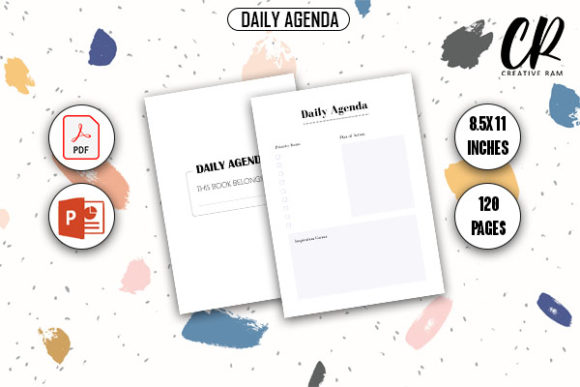
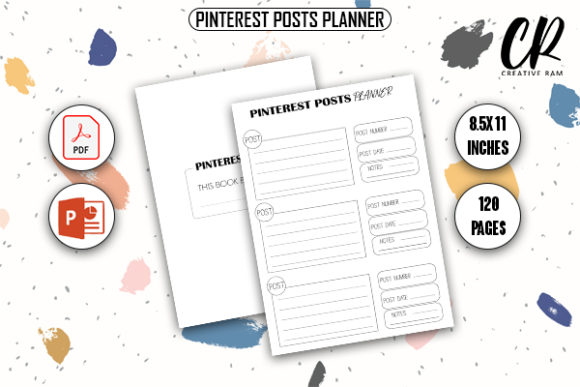
Unlike generic content planners, this tool is formatted for Amazon KDP, meaning it's designed to be printed and sold as a physical planner or used digitally. It comes in both PDF and PPTX formats, with 120 pages and a standard 8.5" x 11" size that's perfect for both digital and physical use. Whether you're a small business owner, a blogger, or a social media manager, this planner gives you the structure you need to plan out your Pinterest content months in advance.
How the Pinterest Posts Planner Works
The planner is laid out to help users map out their Pinterest content visually and strategically. Each section includes spaces to write down post ideas, keywords, target audiences, and publishing dates. It also includes prompts for seasonal content, trending topics, and content repurposing—making it ideal for anyone looking to build a consistent presence on Pinterest without running out of ideas.
Because it's delivered as a print-ready PDF and editable PowerPoint file, users can either print it and write by hand or customize the templates digitally. This dual-format approach makes it accessible for both digital and analog planners, which is especially useful for creators who prefer to sketch out ideas or make quick edits on the go.
Real-World Uses for the Pinterest Posts Planner
Let’s look at a few realistic scenarios where this planner can make a real difference:
- Small business owners who manage their own social media can use the planner to schedule content around product launches, promotions, and seasonal campaigns.
- Bloggers and content creators can plan out content themes for the month, ensuring they're covering a variety of topics and not repeating ideas too often.
- Educators and course creators can use the planner to map out educational pins, infographics, and how-to guides that align with their course content or curriculum.
- Freelancers and agencies managing multiple accounts can use the planner to coordinate content across clients and ensure no deadlines are missed.
Each of these users benefits from having a structured system in place. For example, a blogger launching a new recipe series can use the planner to outline which recipes to feature each week, what keywords to target, and which visuals to create. This level of planning helps avoid last-minute scrambles and ensures content is cohesive and aligned with audience interests.
Why This Planner Stands Out
There are many content planners available online, but few are as tailored to Pinterest as this one. Pinterest is a visual search engine, so planning content for it requires more than just a calendar. You need to think about keywords, visuals, and how each pin fits into a broader content strategy. That’s where the Pinterest Posts Planner - KDP Interior shines—it's built with those specific needs in mind.
Because it's formatted for Amazon KDP, it’s also a great option for creators who want to sell their own planners or content tools. The inclusion of both PDF and PPTX files means you can tweak the design to match your brand before publishing it on Amazon. This makes it a valuable asset not just for personal use, but also for entrepreneurs looking to create and sell digital products.
Who Should Use This Planner—and Why It Matters
This planner is especially useful for anyone who relies on Pinterest for traffic, brand visibility, or sales. That includes:
- Marketing professionals
- Influencers and content creators
- Online course instructors
- Small business owners
- Printable designers
For example, an online coach who uses Pinterest to attract new clients can use the planner to map out pins that target different pain points each week. By planning ahead, they can ensure they're consistently showing up in search results and offering value to potential clients.
Similarly, a lifestyle blogger who shares DIYs, recipes, and home decor tips can use the planner to organize their content around holidays, seasons, or trending topics. This helps them stay relevant and visible without constantly reinventing the wheel.
What to Consider Before Using the Planner
While the Pinterest Posts Planner - KDP Interior is a powerful tool, it’s not one-size-fits-all. Here are a few things to keep in mind before you download or use it:
- Know your content goals. Are you trying to drive traffic to your blog? Build brand awareness? Promote a product? Your goals will shape how you use the planner.
- Be realistic about your schedule. Don’t plan more content than you can realistically create and publish. The goal is to reduce stress, not increase it.
- Customize it to fit your needs. The PPTX file allows for easy customization, so take advantage of that to tailor the planner to your workflow.
- Pair it with a scheduling tool. If you’re planning content weeks in advance, consider using a tool like Tailwind or Buffer to schedule your pins automatically.
Also, if you're new to Pinterest marketing, you might want to spend some time learning the basics—like keyword research, image sizing, and board organization—before diving into detailed planning. The planner works best when paired with a solid understanding of how Pinterest works.
Getting the Most Out of Your Pinterest Planner
Once you have the planner in hand, the key is to use it consistently. Here are a few tips to help you get started:
- Set aside time each week to fill in the planner for the upcoming week or month.
- Use the idea prompts to brainstorm fresh content that aligns with your goals.
- Review past content to avoid repetition and identify what’s working.
- Track your analytics to see which types of pins perform best and adjust your strategy accordingly.
By integrating the planner into your workflow, you’ll not only save time but also improve the quality and consistency of your Pinterest content. Over time, this can lead to increased traffic, better engagement, and more conversions—whether that means more blog visits, product sales, or email signups.
Final Thoughts
The Pinterest Posts Planner - KDP Interior is more than just a downloadable file—it's a practical tool for anyone serious about growing their presence on Pinterest. Whether you're creating content for yourself or for clients, having a structured way to plan and organize your ideas can make a big difference in your productivity and results.
If you're looking for a way to simplify your Pinterest strategy and stay ahead of the curve, this planner is definitely worth a closer look. With its KDP-ready format and flexible file types, it's a smart investment for both personal use and digital product creation.